Assigning data to a saturation property model
After creating the saturation property model, the next step is assigning data to your model (model > Saturation > Saturation Property Modeling > Assign Data).
To assign data to a saturation property model
- On the Assign Data form, select the saturation property model from the Property model drop-down list.
- In the Assign Data section of the form:
- Function model Select the saturation function model which will be used to populate the 3D grid.
- Target grid Select the 3D grid you want to populate with saturation properties. This will also filter out the options you see in the Grid Properties drop-down lists below.
- In the Grid Properties section of the form, select the properties you want to assign from the drop-down lists:
- Assign a Facies grid property if you have defined your saturations per facies class in the saturation function model. If you assigned another discrete log to your saturation function model, assign that discrete grid property here as well.
- Assign Porosity and/or Permeability grid properties if you have used these properties in the assigned saturation function model.
- Assign a Net rock grid property if you want to ignore the non-net cells. Non-net cells will have an undefined saturation value. If you do not assign a Net Rock grid property, the entire model will be regarded as net.
- Model ( Facies
 , rock property
  , permeability
  ) If a grid property is created with a modeling workflow, its model will be available in the drop-down list. Select a model to use its associated grid property.
 - Grid Property (
 ) If a grid property is created without a modeling workflow, it will be available in the drop-down list. For example, you may have created a property with the Property Calculator.
 - In the Property Calculation section of the form, select the method you want use from the Method drop-down list. See Saturation calculation methods for more on this.
- Keep in mind that the fluid model grid properties, which are output from your fluid model, are used as input for calculating saturation properties. If your fluid model grid properties are missing you will receive an error message as a pop-up window when you run your model at the end of the workflow.
- Click Apply to assign data to your model and keep the form open, or click OK to assign data and proceed to the Run Model form.
If you are using a saturation function model created with the 'Constants' method, you do not need to assign a Permeability grid property since it will not be required for the saturation calculations.
The drop-down lists for grid properties are populated with models and grid properties:
Different methods of calculating 3D grid saturation properties
Three different methods can be used:
- Cell center
- Cell average - height weighted
- Cell average - volume weighted
These methods are explained through the examples below. In these examples, for the purpose of simplicity, a saturation function model created with the 'Constants' method is used.
Cell center method
The saturation values (Sg, So, Sw) calculated at the cell center depth are assigned to the whole grid cell. The saturation values depend on the location of the cell center (i.e. either above GOC, or between GOC and FWL, or below FWL). If you assign the cell center method for generating Volumetrics Report, you cannot use the fluid levels information for defining fluid legs. In this case the fluid leg definition, by default, will be based on the saturation cell values.
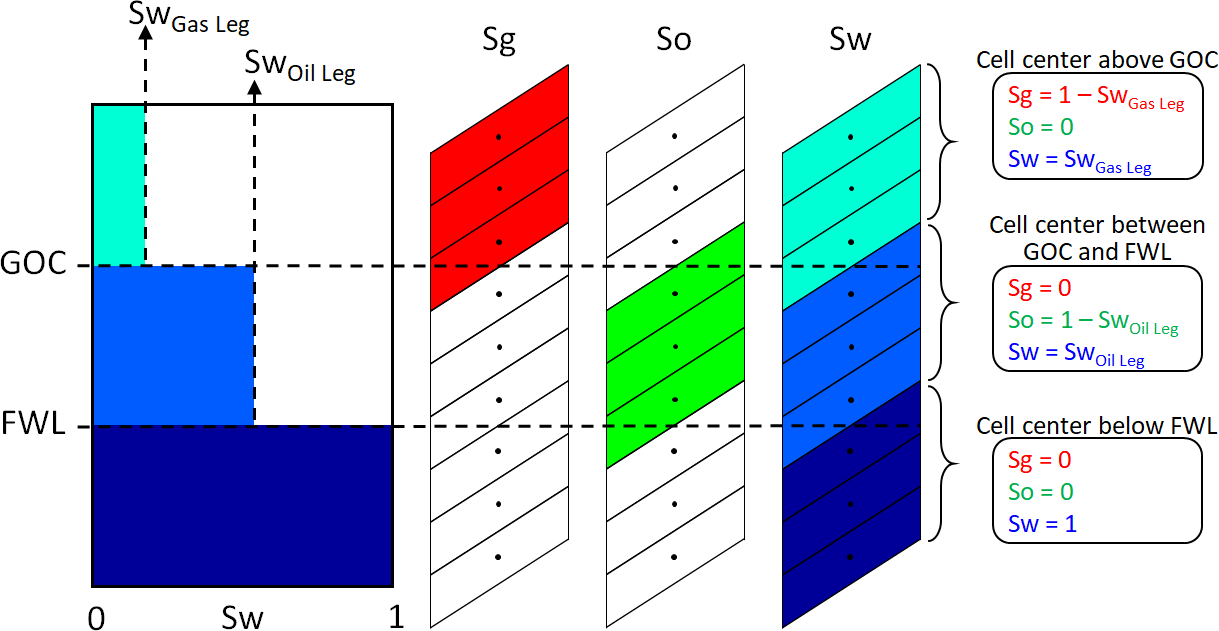
Cell center method - Example for a saturation function model created with the 'Constants' method. click to enlarge
Height weighted cell average method
The water saturation values (Sw) are calculated for the topmost and the bottommost points of each grid cell (i.e. Swtop, Swbottom). The difference between the Swtop and Swbottom is calculated (i.e. ΔSw). The cells are sliced horizontally until the ΔSw for each slice is smaller than 5%. The height weighted average of saturation values of the slices is assigned to the whole grid cell.
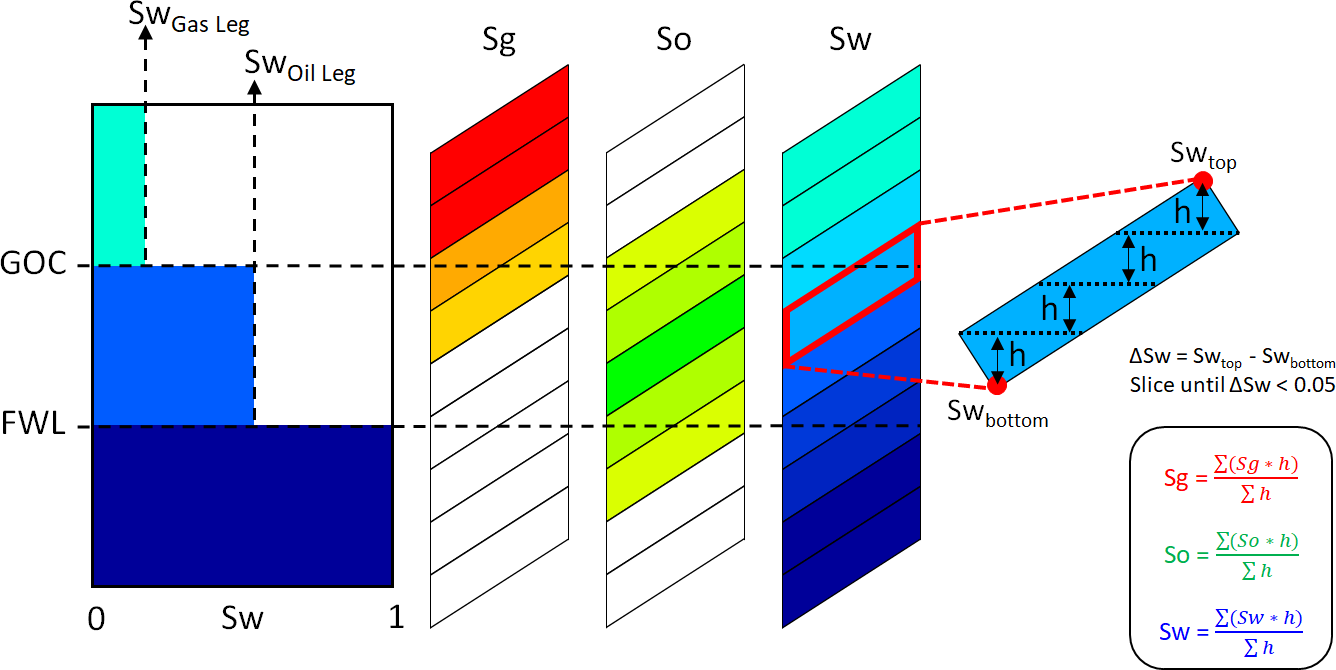
Height weighted cell average method - Example for a saturation function model created with the 'Constants' method. click to enlarge
Volume weighted cell average method
The water saturation values (Sw) are calculated for the topmost and the bottommost points of each grid cell (i.e. Swtop, Swbottom). The difference between the Swtop and Swbottom is calculated (i.e. ΔSw). The cells are sliced horizontally until the ΔSw for each slice is smaller than 5%. The volume weighted average of saturation values of the slices is assigned to the whole grid cell.
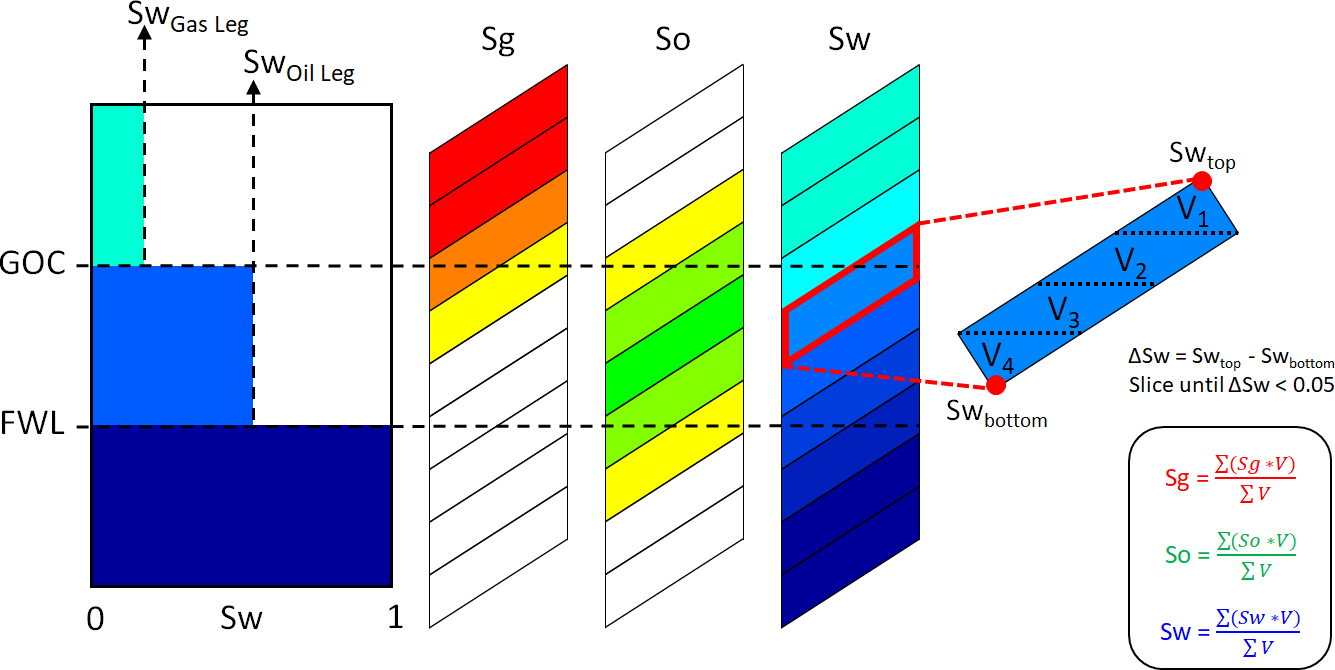
Volume weighted cell average method - Example for a saturation function model created with the 'Constants' method. click to enlarge
Comparison of methods
The importance of these calculation methods lies in their impact on the distribution of saturations, and thus on the total volume of hydrocarbons in place. The difference in the resulting hydrocarbon volumes will be larger especially if the grid cells intersecting the free water level (FWL) are large and/or highly inclined.
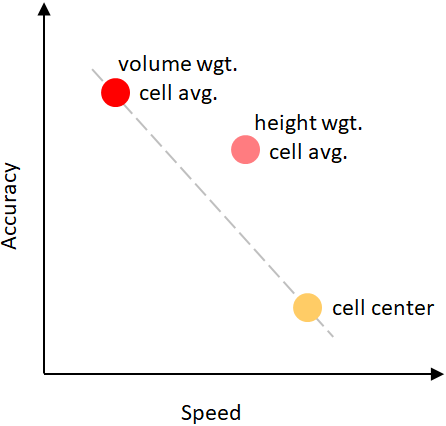
Comparing performance of different saturation calculation methods. click to enlarge
In terms of performance, there is a trade-off between the speed and the accuracy in the saturation calculations. The volume weighted cell average method provides the most accurate saturation values. The drawback is that it might require extra time to perform the slicing of the cells, depending on the complexity of the cell geometries (e.g. faulted or eroded cells).